
I help E-Commerce and B2B brands turn marketing spend into compounding revenue.
AI and Growth Marketing Consultant | Fractional CDO
Shopify SEO Expert for Stores That Have Outgrown the Basics
Shopify gets you live in a weekend. Then it quietly caps you. Shades built as separate products, a theme that cuts every title at 70 characters, collection templates with no H1, and old handles that never got redirected. None of it shows up as an error. It just shows up as clicks you don't get.
I'm Ram Kr Shukla, and I fix Shopify stores at the template level. My most documented result is a fashion store that reached 120,000 monthly organic visitors in 14 months. The field notes below come from Shopify audits since then. If you'd rather judge SEO on acquisition cost against paid, I also work as a D2C SEO consultant.
Get a Shopify SEO AuditWritten by Ram Kr Shukla, SEO and growth consultant, 20+ years, 50+ brands.
Quick answer
A Shopify SEO expert fixes what the platform and your theme get wrong by default: duplicate URLs from variants, old handles and collection paths, templates that drop the H1 and meta description, and product titles cut mid-word. Then they turn bare collection grids into pages that rank for buying searches, and prove the result in Search Console and GA4. On the fashion store in my published case study, collection pages ended up earning over 70% of organic revenue.
Store figures on this page come from real client audits. Brand names, product names and URLs are withheld.
What Does a Shopify SEO Expert Actually Fix?
Mostly things your theme does on every page at once. That's the good news. A Shopify problem is rarely 300 separate problems; it's one template, one Liquid filter, or one product setup decision repeated 300 times. Fix the template and every page it renders gets better the same day.
Here's the work, in the order it usually pays back:
Collection pages built for buying searches
Collections are Shopify's category pages, and they target the searches with the most commercial intent. Most themes render them as a title and a product grid. I turn them into proper landing pages with intro copy, FAQs and links to related collections. The full method is in my collection page guide.
One clean URL for every product
Variants, collection paths, old handles, filters and Markets parameters can all spawn extra URLs for the same product. The job is to make sure Google crawls and ranks one of them, and that your own internal links point at that one.
Templates that output the basics
A missing H1, an empty meta description or a truncated title tag usually lives in a single Liquid file. I find it, write the fix as one developer ticket, and check it shipped on every page type.
Speed without a pile of apps
Every app injects scripts. A store running fifteen apps often carries render-blocking weight that nobody connects to the app installed eight months ago. I audit each script against what it earns before anything gets removed.
Structured data that matches the page
Product, Offer and BreadcrumbList on product pages, FAQPage where the FAQ is visible, and nothing marked up that a shopper can't see. Collection pages often carry no schema at all, even when product pages are fine.
Content that feeds the collections
Buying guides and comparison posts in Shopify's blog, linked into the collections they support. Done properly, the blog becomes a top of funnel engine instead of a news page nobody reads.
Migrations in and out
Replatforming to or from Shopify is where stores lose years of rankings in a weekend. I map every old URL to its new one and check parity before and after launch.
Eight Shopify SEO Problems I Keep Finding in Real Stores
These come from Shopify audits I've run, mostly on D2C brands. The numbers are real Search Console and crawl figures. The store names aren't on this page, and the pattern matters more than the brand anyway, because you'll probably recognise at least three of these in your own store.
1Shades or sizes built as separate products
What you see: Your generic category term gets thousands of impressions and almost no clicks, and the URL ranking for it is one specific shade.
What I found: A beauty brand sold one complexion product in 19 shades, each set up as its own Shopify product with its own handle and a self-referencing canonical. Body copy on two shades was near identical (2,866 words against 2,898). For the category's main head term, 33 URLs from the store competed over 28 days: 26,390 impressions, 9 clicks. The top six results were all shades of the same product. The collection page that should have ranked got 152 of those impressions.
The fix: Treat it as a URL architecture problem, because no amount of copy fixes it. Either rebuild the shades as variants of one product, or canonicalise each shade to a parent page. Then point the generic head term at the collection and let shade pages win the “product plus shade” searches they're actually good for. The full decision guide: Shopify variants vs separate products.
2Product titles cut at exactly 70 characters
What you see: Product snippets in Google look nearly identical, and the one word a shopper needs (the shade, size or flavour) is missing.
What I found: On the same store, every one of the 12 highest-impression product URLs had a title tag ending mid-word at 69 or 70 characters. The theme ran a Liquid truncate on the product title with no ellipsis, and used the same cut string as the H1. Because product names were long and front-loaded with claim words, the shade name, the only token that differs between SKUs, was exactly what got cut.
The fix: Don't truncate a long string. Build the title tag from parts instead: short product name, then the variant attribute, then the brand. Or shorten the product titles themselves. Then rewrite the meta descriptions, which on that store were the raw product description pasted in. More in fixing truncated Shopify title tags.
3Collection templates with no H1 and no meta description
What you see: Collections rank, but snippets look bare, and an audit tool reports dozens of “missing H1” errors.
What I found: A crawl found 35 of 35 collection pages with no H1 and 31 of 35 with no meta description. Product, policy and blog templates were clean. The dev team had been about to quote a week of work, because the audit they'd been handed listed it as 35 page level tasks.
The fix: It's one Liquid edit to the collection template, so write it up as one ticket. Once the H1 block renders, the collection description field in Shopify admin finally has somewhere to show up, and you can decide page by page what deserves copy.
4Handle sprawl: old URLs that never went away
What you see: Search Console shows two or three URLs for what you think of as one product, all with impressions.
What I found: One product had 22 distinct handles. The usual pattern was an older handle alongside a newer one carrying a shade code, both live and both indexed. The strongest product URL on the whole site, 46,173 impressions and 1,116 clicks in 28 days, had a newer twin quietly splitting its signals. The blog had the same issue: 11 articles published under two slugs, plus 3 URLs that differed only in letter case.
The fix: Pick the URL with the history, add Shopify URL redirects from every other handle, and update internal links so nothing in the theme or menus still points at a redirect. When you rename a handle in Shopify admin, tick the box that creates the redirect. Somebody always forgets it once.
5Parameter URLs in the index
What you see: Search Console's page report lists URLs ending in ?variant=, ?page=2 or ¤cy=.
What I found: 91 URLs with a query string were earning impressions, 15,668 of them over 28 days. The worst was a ?variant= product URL with 6,881 impressions, and a paginated collection URL ranked on its own with 3,479. Some carried country and currency parameters from Markets.
The fix: Check that the canonical on each of these points at the clean URL, and stop linking to parameter versions from the theme. For filters, decide which deserve to rank and block the rest. My faceted navigation guide covers that decision.
6A crawl that lies because Shopify rate-limited it
What you see: Your audit tool reports a wave of 4xx errors on collection pages, but the pages load fine in a browser.
What I found: At Screaming Frog's default speed, Shopify returned 429 Too Many Requests on 83 of the 86 HTML pages the crawler reached, including 54 of 55 collection URLs, while images and scripts from Shopify's CDN loaded fine. Every one of those pages showed up as a non-indexable client error.
The fix: Throttle the crawler to about one thread and one URL per second before you trust a Shopify crawl. A small store still finishes in about ten minutes. A crawl with 429s in it is misleading, so never report findings from one. My settings are in how to crawl Shopify without 429 errors.
7Campaign and creator collections that rank but don't get clicked
What you see: You've got dozens of landing collections from campaigns or influencer collaborations, and nobody knows whether they help.
What I found: One store ran 44 creator landing pages as Shopify collections. Together they earned 19,149 impressions and 616 clicks over about three months. The best one ranked at position 4.3 for the creator's name but earned only a 2.49% click-through rate, because its title was just the name, it had no meta description and no H1. Meanwhile, 25 of the 44 had two clicks or fewer between them.
The fix: Fix the snippet on the ten that carry demand. Write the content people actually search for, which on that store was which shade the creator wore. Then noindex or retire the rest. Filler copy on all 44 helps nobody. The playbook is in influencer collection pages on Shopify.
8Searches in the shopper's own language
What you see: Your explainer posts rank on page one for queries that don't look like your keyword list.
What I found: On an Indian store, 207 Hindi and Hinglish query rows (searches like “what is X” typed as X kya hota hai) earned 3,735 impressions at an average position of 7.7, and just 6 clicks. The pages were already ranking. The snippets didn't speak the searcher's language.
The fix: Skip the translated site. Add one line near the top of each explainer phrased the way the query is typed, followed by the plain answer. It costs a sentence per page on pages that are already on page one. How to find them: Hinglish and Hindi queries for Indian D2C.
Is Shopify Bad for SEO?
No. Shopify is opinionated, and stores that work with its opinions rank fine. The fashion store in my case study is on Shopify. The trouble starts when a store fights the platform or never learns which parts are fixed and which parts are yours to change.
What Shopify gets right out of the box
- Product URLs reached through a collection path (
/collections/x/products/y) carry a canonical pointing to the clean/products/yURL. - An XML sitemap is generated and kept up to date for products, collections, pages and blog posts.
- Hosting, SSL and a global CDN are handled, so the basics of speed and security aren't your problem.
- Since 2021 you can edit
robots.txtthrough arobots.txt.liquidtemplate. - Markets adds hreflang for international domains and subfolders automatically.
What you can't change
- The URL prefixes are fixed:
/products/,/collections/,/pages/and/blogs/stay in every URL. Plan your handles around them. - Blog posts live under a blog handle, usually
/blogs/news/, which is why naming the blog sensibly on day one matters.
What's yours to fix
- Themes often link to the collection path version of a product, so Google keeps finding the non-canonical URL. Removing
within: collectionfrom the product links in the theme sends crawlers straight to the canonical. - Single tag pages stay crawlable by default, and they multiply fast on stores that tag heavily.
- Product setup decisions, such as shades or sizes as separate products, create the duplication in field note 1. Shopify won't warn you.
- Title, H1 and meta logic lives in your theme's Liquid, so a single bad filter repeats on every page.
Shopify or Shopify Plus?
Every fix on this page works on both. Plus gives you more control over checkout and scripts, which helps at scale. Whether you need it is a business call.
For the full list of duplicate content patterns the platform creates, read Shopify’s built-in SEO traps.
Why Collection Pages Decide Most Shopify Stores
If I could fix one thing on a Shopify store, it'd be the collection pages, every time. They target the searches people make when they're ready to buy, they sit high in the site structure, and on most stores they're a product grid with a title on top.
On the fashion store in my case study, collection pages ended up earning over 70% of all organic revenue. That's the pattern I see again and again. Field note 1 shows the reverse: a collection page that should have owned a head term got 0.6% of its impressions, because product pages crowded it out.
What a ranking collection page carries
An H1 and intro copy that match the search. A few hundred words on how buyers choose in this category, written in the words they search with.
A title and meta description built from Search Console. Written against the terms the page already gets impressions for, so near misses turn into clicks.
Visible FAQs with FAQPage schema. The pre-purchase questions people actually ask, answered on the page.
Links to related collections and supporting guides. Default themes almost never do this, and it's how authority moves from blog posts to money pages.
A clear owner for every head term. One collection per generic term, with product and variant pages kept to the specific searches they win.
The 120K case, briefly
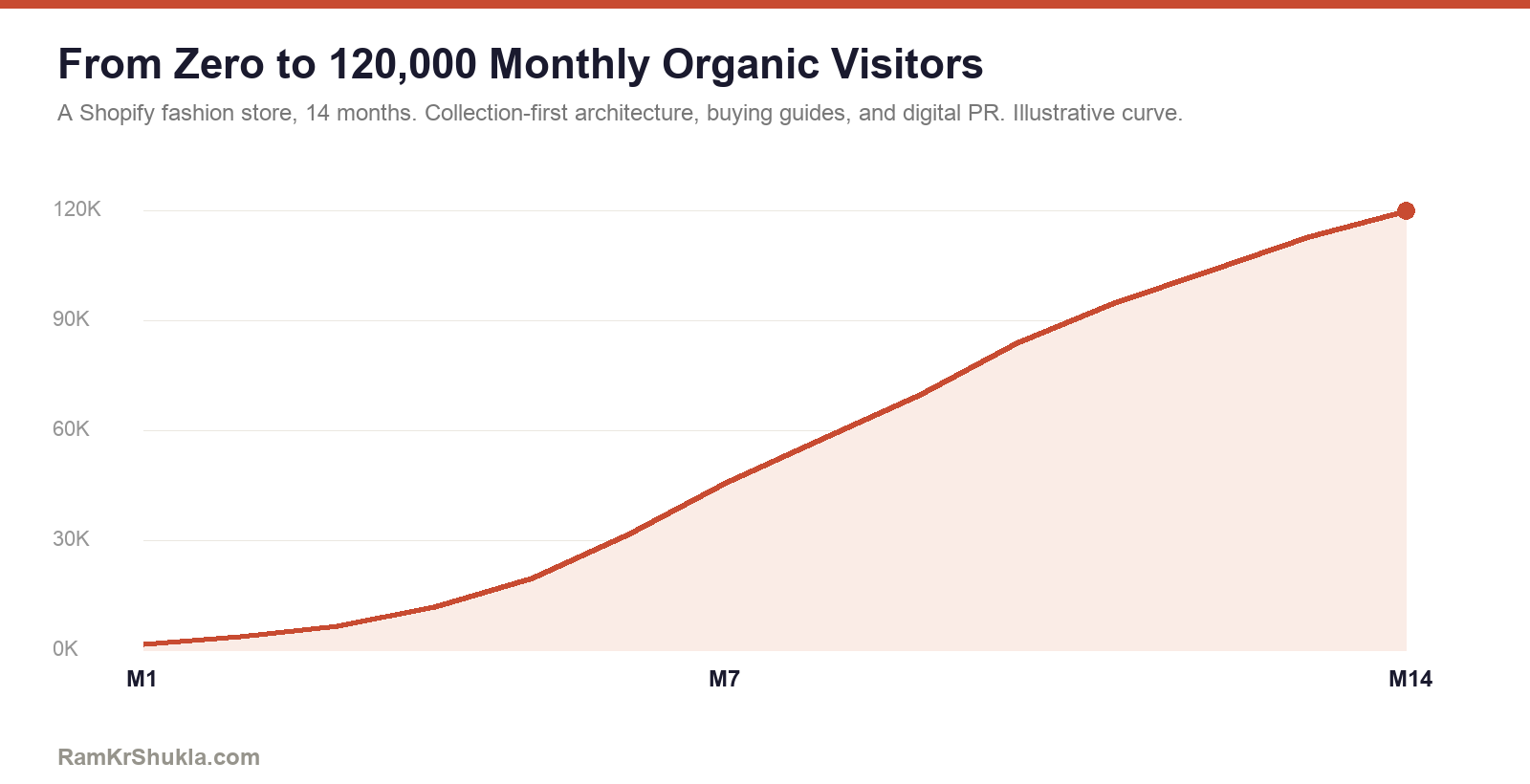
The fashion store started with more than 200,000 URLs in the index and almost no organic traffic. We cleaned up what was indexed, built collection pages as buying guides before scaling blog content, and grouped the catalogue into topic clusters so Google could make sense of it. Fourteen months later it was at 120,000 monthly organic visitors. The method is published in full in the Shopify SEO case study.
Product Pages, Variants and Markets on Shopify
Collections win the broad searches. Product pages win the specific ones: a named product, a shade, a size, a model number. They need a different setup, and most of the work is in the template and the product data rather than the copy.
Build the title tag from parts
Shopify themes usually pull the product title straight into the title tag and the H1. That's fine until product titles get long. A safer pattern is a short product name, then the variant attribute that matters, then the brand. Something like Lip Tint: Rosewood | YourBrand. It stays under the cut-off, and the word that tells products apart shows up first.
Decide variants before you load the catalogue
If a shopper would search for the product and pick a shade on the page, it's a variant. If people search for each version by name, with real volume, and the versions genuinely differ, separate products can work, as long as one page clearly owns the generic search. On Shopify Plus, the Combined Listings app can show separate products together on one page while each keeps its own URL. That's a merchandising feature. You still have to make the canonical decision yourself.
Out of stock and discontinued products
- Coming back: keep the page live, mark it out of stock in the Offer schema, and offer a back in stock alert. Deleting it throws away its rankings for a few weeks of missing stock.
- Gone for good, with a replacement: redirect the URL to the closest product.
- Gone for good, no replacement: redirect to the collection it belonged to, so the visit and the link value still land somewhere useful.
Reviews and rich results
Most review apps add AggregateRating to the Product schema. Check that the rating in the markup matches what shoppers see on the page, and that you don't end up with two Product blocks, one from the theme and one from the app. Duplicate Product markup is one of the most common things I find on Shopify product pages.
Selling in more than one country
Shopify Markets can put each country on its own subfolder or domain and adds hreflang for you. Three things still need checking. Translated handles, because an English handle on a German page wastes the URL. Currency and country parameters that leak into indexed URLs, as in field note 5. And same-language markets, such as the US and UK, which need genuinely localised prices, spelling and shipping copy to be worth separate pages. My international SEO work covers the full setup.
For the full product template checklist, read product page SEO: the 12 elements.
The Shopify Technical SEO Checklist I Run on Every Store
This is the unglamorous part that every content and ranking gain depends on. Each item is checked at the template level first, because that's where Shopify problems live.
Throttled crawl first
One thread, about one URL per second, so Shopify's rate limit doesn't fake a wave of errors.
Canonical and internal links agree
Theme links point at /products/ URLs, not collection path versions.
Handles and redirects
Every retired handle redirects once to the live URL, with no chains.
Variant and parameter URLs
?variant=, ?page= and Markets parameters canonicalise to the clean URL.
Tag and filter pages
Only filters with real search demand stay indexable. The rest are blocked or noindexed.
Template output
One H1, a real title tag and a meta description on product, collection, page and blog templates.
App and script weight
Each app's scripts weighed against what the app earns. Core Web Vitals fixed in the theme itself.
Schema that matches the page
Product and Offer wired to live price and stock. FAQPage only where the FAQ is visible.
Sitemap and index hygiene
Junk out of the sitemap, and the indexed count checked against what should rank.
Related reading: index bloat, pagination for product grids, client-side rendering on product pages and crawl depth.
How to Prove Shopify SEO Is Making Money
Most Shopify SEO reports can't answer the only question a founder asks: is this paying for itself? Usually that isn't the SEO's fault. The tracking underneath is broken in ways nobody checked.
Check the funnel before you trust it
On one store, GA4 logged 901 product view events against 1,587 purchases over the same four weeks. A shopper can't buy what they never viewed, so the upper funnel was broken (the full method is in my Shopify GA4 funnel audit). Once it was fixed, the next four weeks showed 413,745 product views, 71,762 add-to-carts and about 7,200 purchases, which steps down the way a real funnel should.
The one-line test
Pull view_item, add_to_cart, begin_checkout and purchase for the same 28 days. If any step is smaller than the step after it, stop reporting and fix the tags first.
Watch where your events actually go
The same store sent events to two GA4 measurement IDs. Page views and add-to-carts went to both. Product list views went to only one. Collection pages also sent no list name, so a cart add from a collection looked the same as one from anywhere else. Until that's fixed, you can't credit collection page SEO in GA4. Measure it in Search Console clicks and GA4 landing page sessions instead.
Strip out the bots before you rank your content
A blog that looked like the store's traffic engine turned out to be mostly bots. In under two weeks it drew 5,887 sessions from the US with 1.7% engaged and no purchases. The home market sent 871 sessions with 33% engaged and 4 purchases. Ranked by raw sessions, the priority list was upside down.
Separate brand from non-brand
Brand searches inflate every SEO report. On one store, non-brand search earned about ten times the impressions of brand search for roughly the same number of clicks, at a tenth of the click-through rate. That gap is the real SEO opportunity. You can split clicks by brand and non-brand in Search Console. You can't split revenue that way, because Google doesn't pass the query into GA4, so anyone promising “non-brand revenue” is guessing.
I go deeper on this in vanity metrics vs revenue and what a real Shopify SEO report contains. If the tags themselves need fixing, that's my GA4 conversion tracking work.
How a Shopify SEO Engagement Runs, Step by Step
Audit and baseline
A throttled crawl, a template by template review, an app and speed audit, and a Search Console teardown of what already earns impressions. You get a prioritised list within two to three weeks.
Fix the templates
Canonicals, handles, variant and parameter URLs, title and H1 logic, and schema, written as developer tickets against each template, so one fix ships once and covers every page.
Build the collections and content
Collection pages rewritten for buying searches, head terms given one clear owner, and blog content linked into the collections it supports.
Measure and compound
Monthly reporting on non-brand clicks, organic landing page revenue and the pages that moved, with the tracking checked before any number goes in a report.
Collection and template fixes usually show in Search Console within two to four months. For an established store, meaningful revenue tends to land in six to nine. From a standing start it takes longer: the 120K store took 14 months.
What Drives the Cost, and How to Choose a Shopify SEO Expert
What drives the cost
- Catalogue size and setup. 60 products with clean variants is a different job from 6,000 products with shades set up as separate items.
- How custom the theme is. Template fixes are quick on a lightly customised theme and slower on a heavily modified one.
- Developer access. If I can ship Liquid changes directly, fixes move in days. If every change goes through an agency queue, the timeline stretches.
- Markets and languages. Each extra market adds URLs, hreflang checks and content decisions.
- Content volume. How many collection pages and guides need writing, and whether your team writes them or I do.
- Tracking state. If GA4 is broken, fixing it comes first, because you can't measure anything else until it works.
Questions worth asking any Shopify SEO expert
- Can you show me a Shopify store you've grown, with numbers you can explain?
- How do you handle variants, old handles and collection path URLs?
- Will you fix things at the template level, or hand me a list of 400 page tasks?
- How do you crawl a Shopify store without getting rate limited?
- How will you report revenue from SEO, and what can't you measure?
Red flags
A guaranteed ranking. A monthly report that's mostly impressions and keyword counts. An audit that lists the same template defect as dozens of separate errors. Or a pitch that's really just an SEO app subscription.
If you're still weighing your options, my consultant vs agency vs freelancer comparison covers the trade-offs honestly.
Common Shopify SEO Mistakes
- Treating collection pages as product grids instead of the pages that should rank.
- Setting up shades, sizes or flavours as separate products without deciding which page owns the generic search.
- Letting the theme truncate titles, so the one word that tells products apart gets cut.
- Renaming handles without redirects, then leaving both URLs live.
- Installing an SEO app and assuming the work's done. Apps automate tags. They don't make decisions.
- Running fifteen apps and wondering why Core Web Vitals won't pass.
- Trusting a crawl full of 429 errors.
- Reporting blog traffic without checking how much of it is bots.
- Migrating to or from Shopify without a full redirect map.
Shopify SEO Questions
Is Shopify bad for SEO?
No. Shopify is opinionated, and stores that understand its quirks rank well. The fashion store in my case study reached 120,000 monthly organic visitors on Shopify. Problems usually come from product setup, theme Liquid and unmanaged URLs.
What does a Shopify SEO expert do?
A Shopify SEO expert fixes the platform and theme defaults that hold rankings back, such as duplicate variant and handle URLs, missing H1s and truncated titles, then builds collection and content pages for buying searches and proves the result in Search Console and GA4.
Should product shades or sizes be variants or separate products?
For SEO, variants of one product are usually better, because separate products split the same search across many near-identical URLs. If shades must stay separate for merchandising, canonicalise them to a parent and give the generic search to a collection page.
Can I change Shopify's /products/ and /collections/ URLs?
No. Shopify fixes those prefixes. You control the handle after them, so choose short, descriptive handles and redirect any handle you change.
Do I need Shopify Plus for good SEO?
No. Every fix on this page works on standard Shopify. Plus adds checkout and script control that helps at scale, so upgrade for business reasons when you're ready.
Will a Shopify SEO app do the job?
Apps handle mechanical tasks like bulk meta tags and redirects. They don't decide which page should own a search, fix theme Liquid or write collection content. Those decisions still need a person.
How long does Shopify SEO take to show results?
Template and collection fixes usually show in Search Console within two to four months. Meaningful revenue for an established store tends to arrive in six to nine months, and longer from a standing start.
Can you help with a migration to or from Shopify?
Yes. I map every old URL to its new one, check redirects and page parity before launch, and monitor Search Console after it, because migrations are where stores most often lose rankings.
Ready to Grow Your Company?
Thirty minutes, one on one. I'll review your current setup, identify the growth opportunities you're sitting on, and give you honest, actionable advice tailored to your business. No sales pitch, just a real conversation about what to fix first.
Schedule a CallYour 30 minutes, mapped:
You keep the findings either way. Whether we work together is a separate conversation.
The Shopify SEO Library
Everything I've written on Shopify and e-commerce SEO, grouped by the problem it solves.
Shopify field guides
Collections and catalogue
Technical
Content and demand
Measurement
About the author
Ram Kr Shukla is an SEO and growth consultant with 20+ years in search across marketplaces, travel, BFSI and e-commerce, and 50+ brands worked with. He's Google Analytics and Google Ads certified and works with founders directly as a consultant or Fractional Chief Digital Officer. More about Ram or find him on LinkedIn.
SEO in Practice

The Blog With Fourteen Million Impressions and Almost No Buyers
Fifteen million monthly impressions at a third of a percent click-through. The traffic was real, the audience was wrong, and fixing it meant deliberately losing most of it.




