AI Search Is Splitting Your Traffic: How to Measure ChatGPT and Perplexity Referrals in GA4
4x
Growth in AI referral traffic across client sites this year
15 min
To build the GA4 view that isolates it
2x+
Conversion rate of AI referrals versus average, consistently
0
Standard reports that show this today
There is a new traffic source growing in your analytics right now, and GA4’s default reports are hiding it inside the referral bucket. Visitors arriving from ChatGPT, Perplexity, Gemini, and Copilot click through when an assistant cites you, and across my client base that stream has roughly quadrupled this year. Small absolute numbers still, but the trend line and the visitor quality demand their own measurement.
Because here is the finding that matters: AI referrals convert at roughly double the site average, consistently, across clients. It makes sense. A visitor arriving from an assistant’s recommendation was pre-sold by the most trusted interface they use. You want to know exactly how many arrive and what they do.
Build the View in GA4, Step by Step
1
Know the referrer signatures
AI referrals arrive with identifiable referrers: chatgpt.com and chat.openai.com, perplexity.ai, gemini.google.com, copilot.microsoft.com, claude.ai, and you.com. Some assistant clicks arrive stripped as direct, so whatever you measure is a floor, not a ceiling. Floors still show trends.
2
Create the channel group
In Admin, under Data display, edit your channel groups: add an AI Referrals channel matching source against a regex of those domains. From that point on, standard reports break the stream out cleanly beside Organic Search and the rest.
3
Build the exploration for history
Channel groups apply going forward. For history, build an Exploration filtered on session source matching the same regex: sessions, engaged sessions, conversions, and landing pages, trended monthly. This is your baseline chart, and it will be a hockey stick at small scale.
4
Study the landing pages above all
Which pages do assistants send people to? That list is your citation footprint made visible: it tells you which content AI systems consider reference-worthy, and it is the template for what to produce more of. This single report has reshaped content plans for my clients more than any keyword tool this year.
Reading the Numbers Honestly
Metric
How to read it
Volume
Small today almost everywhere. Single digit percentages. The trend is the story, not the total
Conversion rate
Consistently above site average. Pre-sold visitors behave like referrals from a trusted friend
Landing pages
Comparisons, definitive guides, and original data get cited. Thin service pages do not
Month over month
The only chart worth presenting. Screenshot it quarterly; the compounding makes the argument for you
“Nobody reported on organic search traffic in 1999 either. The brands that measured it early built the playbooks everyone else bought later. AI referrals are that moment again, with a fifteen minute setup cost.”
Ram Kr Shukla, SEO and Growth Consultant
Once the measurement exists, it changes decisions: the landing page report feeds your content plan, the conversion data justifies AI visibility investment to whoever owns the budget, and the baseline lets you actually evaluate whether citation work, the kind I documented in my AI recommendations research, moves your numbers. Measurement first, then optimisation has something to answer to.
Want the full AI visibility measurement stack installed?
I set up AI referral tracking, citation monitoring across assistants, and the quarterly baseline test as part of every AI SEO engagement. Know your numbers before your competitors know theirs.
Google Search Console: 7 Reports Most Marketers Never Open (And What They Reveal)
7
Reports beyond Performance and its averages
Free
Every one of them, sitting in your property now
5 of 6
Ranking emergencies I diagnosed started in these reports
15 min
Monthly routine to check all seven
Most marketers use Search Console as a clicks chart: open Performance, look at the line, close the tab. Meanwhile the reports that actually diagnose problems, the ones I open first on every audit and every emergency call, sit unvisited one menu below. Five of the six ranking emergencies I documented recently were solved in these reports, not in the Performance chart.
The Seven, and What Each One Confesses
1
Page indexing, the exclusions side
Everyone checks how many pages are indexed. The diagnosis lives in why pages are excluded: crawled currently not indexed rising means a quality or demand problem, discovered not crawled means crawl budget or internal linking, and a sudden spike in noindex is a deploy accident announcing itself.
2
Crawl stats, hidden under Settings
Crawl requests trending down, response times trending up, or a spike in 404 fetches: this report shows how Google experiences your server. A slow, error-prone crawl experience quietly reduces how much of your site Google bothers with.
3
URL Inspection’s rendered HTML
Not a report, a tool, and the definitive answer to what Google actually sees on a page: the rendered HTML, the resources it could not load, the canonical it chose versus the one you declared. My client-side rendering post exists because of what this tool reveals.
4
Performance, filtered to regex and compared periods
The default view averages everything into mush. Regex filters isolate query families, brand versus non-brand, questions versus commercial. Period comparison shows exactly which queries lost clicks after a change. The report everyone opens, used the way almost nobody uses it.
5
Enhancements and rich result reports
Where schema breakage announces itself: valid items dropping after a plugin update is the silent click-through killer I keep finding weeks after the damage started. Calendar this one after every site update.
6
Links, internal and external
Which of your pages Google considers most linked, internally and externally. The internal list regularly contradicts what teams believe their architecture emphasises, and that contradiction is the internal linking to-do list.
7
Removals and manual actions
Empty for most sites forever, which is why nobody looks, which is why a stray removal request or a manual action sits undiscovered while everyone debugs the algorithm instead. Thirty seconds, monthly.
“The Performance chart tells you something changed. The reports underneath tell you what, where, and usually who deployed it.”
Ram Kr Shukla, SEO and Growth Consultant
The 15 minute monthly routine:
Page indexing: exclusions trend, any new exclusion reason appearing
Crawl stats: request trend and average response time
Enhancements: valid item counts versus last month
Performance with brand regex excluded: non-brand clicks trend
Links: top internally linked pages still match your priorities
Removals and manual actions: still empty
One URL inspection on your most important money page
A Worked Example: The Twenty Minute Diagnosis
A founder called about a traffic slide their agency had spent three weeks attributing to a core update. The Performance chart did look like a slope. But the monthly routine from this post found the truth in twenty minutes: Page Indexing showed excluded pages climbing week over week, the exclusion reason was alternate page with proper canonical tag, and the timing matched a platform migration. The new platform was generating parameter URLs that the canonical setup handled badly, and Google was steadily choosing the wrong versions.
No update, no penalty, no content problem: a canonical configuration error, visible in a free report nobody had opened, fixed in an afternoon by the same developer who caused it. That is the recurring lesson of these seven reports. They rarely tell you something is wrong before the traffic chart does, but they tell you what is wrong, which is the difference between three weeks of theory and one afternoon of fix.
How to make the routine stick in a team:
Calendar it monthly with a named owner, not a shared intention
Log five numbers each run: exclusions, crawl requests, response time, valid rich results, non-brand clicks
Screenshot the exclusion reasons breakdown, because trends matter more than totals
Run it within 48 hours after every deploy, migration, or plugin batch update
Escalate on trend breaks, not absolute numbers, since every site’s baseline differs
Questions I Get on This Topic
GSC data seems to disagree with GA4. Which is right? Both, about different things. GSC measures search impressions and clicks at Google’s edge; GA4 measures sessions after consent, blockers, and JavaScript. Directional agreement is what you want; numeric identity is impossible. Diagnose search problems in GSC, behaviour in GA4.
How long is GSC data retained? Sixteen months, which is why the monthly log matters: it becomes your only view beyond that horizon, and year over year comparisons are where slow structural decay becomes visible.
Is the API worth setting up? Once you are logging monthly by hand, yes: the API removes the sampling and row limits of the interface and feeds dashboards. But the habit comes first. Automation of a report nobody reads is decoration.
These seven reports are the monitoring layer of my technical SEO service, and the starting instrument of every SEO audit I run.
Want an expert eye on your Search Console data?
Every engagement I run starts inside these seven reports. If your traffic moved and nobody can say why, this is where the answer is sitting.
How to Turn Your Entire Website Into an AI Knowledge Base Using Screaming Frog and Markdown
15 min
Setup time for the full workflow
1 crawl
Your whole site converted to markdown
Zero
Code you need to write yourself
Any AI
Works with Claude, ChatGPT, and custom GPTs
Here is a question that did not exist two years ago and now decides real competitive advantage: how easily can an AI read your website?
Not index it. Read it. If you use Claude, ChatGPT, or any AI assistant for marketing work, you have probably hit the same wall I have: the AI does not know your site. It does not know your service pages, your case studies, your positioning, or the way you phrase things. So every brief starts from zero, and every output needs heavy editing to sound like you.
There is a clean fix for this, and it takes about fifteen minutes with a tool most SEOs already own: Screaming Frog, using a markdown conversion script the Screaming Frog team published on their blog. What follows is the full setup, plus the layer most people miss: what to actually do with the markdown once you have it.
Why Markdown Is the Native Language of AI
Your web pages are wrapped in thousands of lines of HTML, CSS classes, tracking scripts, and layout markup. When you paste a URL into an AI tool, most of what it processes is that wrapper, not your content. Markdown strips all of it: clean headings, clean paragraphs, clean lists. Nothing else.
This matters for two very practical reasons. First, AI models were trained on enormous amounts of markdown, so they parse its structure natively: a heading means a topic, a list means discrete items. Second, tokens cost money and context space. The same page as markdown can be a tenth the size of its HTML, which means you can fit ten times more of your site into an AI’s working memory.
“Google reads your HTML. AI reads your markdown. The brands that prepare content for both are playing the next decade, not the last one.”
Ram Kr Shukla, AI SEO Consultant
The Setup: Five Steps in Screaming Frog
1
Open Custom JavaScript settings
In Screaming Frog, go to Configuration, then Custom, then Custom JavaScript. This feature lets the crawler run a script against every page it visits, which is what performs the conversion.
2
Add the markdown conversion script
Click Add, and choose the content-to-markdown snippet from the library, or paste the version from the Screaming Frog blog. The script uses the page’s rendered DOM, so it captures what a visitor actually sees, not just raw source.
3
Switch rendering to JavaScript
Custom JavaScript needs the built-in Chrome renderer. Under Configuration, Spider, Rendering, select JavaScript. The crawl runs slower this way, which is a fair trade for accurate extraction.
4
Run the crawl in Spider mode
Enter your domain and start. For most consultant and SME sites this finishes in minutes. For large e-commerce sites, crawl a representative section first: category pages, top products, and key content.
5
Export from the Custom JavaScript tab
Each URL now carries its markdown version in the Custom JavaScript section. Export the lot to a spreadsheet or individual files. That export is your site as an AI-readable knowledge base.
The Part Everyone Skips: Curate Before You Feed
Here is the mistake I see immediately whenever this technique gets shared: people export 400 pages of markdown, dump the whole blob into an AI project, and expect magic. The result is usually worse than nothing. Large unfiltered context degrades model performance, buries the important pages under boilerplate, and wastes the context window on your privacy policy.
Treat the export like a content audit, because it is one. Keep the pages that define your business: services, positioning, case studies, your best guides. Cut thin pages, tag archives, legal pages, and anything outdated. For most sites, the useful knowledge base is 15 to 40 documents, not 400. A small curated set the AI can actually use beats an archive it drowns in.
What to Do With the Markdown: Four Practical Uses
Use case
What it unlocks
Claude Projects or custom GPT knowledge
Every brief, draft, and edit starts already knowing your services, voice, and case studies. Output needs a fraction of the editing.
Content gap analysis
Give the AI your site plus three competitor crawls and ask what topics, entities, and objections they cover that you do not.
Internal consistency audit
Ask the AI to find contradictions across your pages: conflicting numbers, outdated claims, positioning drift. Brutal and useful.
AI visibility preparation
Seeing your content the way an AI sees it shows you exactly why assistants do or do not cite you, and what to restructure.
The Bigger Picture: This Is Where Search Is Going
This little workflow points at something much larger. The industry is quietly converging on the idea that websites need an AI-readable layer: the emerging llms.txt convention, AI crawlers requesting clean content, and assistants deciding which brands to cite based on how clearly they can parse what you offer. Markdown conversion is the manual version of that future. Doing it now teaches you exactly how legible your brand is to the systems that increasingly answer your buyers’ questions.
And if your site converts to markdown badly, with walls of unstructured text, vague headings, and key claims buried in design elements, that is not just an AI problem. It is the same structural weakness that holds back your rankings and conversions with human readers too. The crawl just makes it visible.
Want to know how visible your brand is to AI search?
I run AI visibility audits that show where your brand appears in ChatGPT, Perplexity, and Google AI Overviews, and exactly what to restructure so assistants start citing you. This workflow is one small piece of that system.
AI SEOBrand VisibilityGEOPython for SEOChatGPTLLM Optimization
AI Visibility · GEO Field Guide
How to Check If ChatGPT Mentions Your Brand: A Free Python AI Visibility Tracker
82%of AI citations come from third-party earned media, not your own pages
44%of LLM citations are pulled from the first 30% of a page
5 minto run this tracker against your own brand
Freeno SaaS subscription, just a short Python script
Short answer: to check your brand’s AI visibility, run a fixed set of buyer-style questions through the ChatGPT (OpenAI) API on a schedule and log whether your brand gets named in the answers. It is the AI equivalent of a rank tracker. Below is the exact free Python script I use, how to read the results, and the GEO moves that actually improve them.
Google is no longer the only place people search. Millions now ask ChatGPT, Claude, Gemini, and Perplexity for recommendations before they ever open a results page. If your brand is missing from those answers, you are invisible to a fast-growing slice of your market, and unlike a Google ranking, nothing tells you by default. You have to measure it deliberately, which is exactly what this guide does.
What this tracker does
The script sends a set of targeted prompts to the OpenAI API, the same questions your potential customers might type, and logs the full responses. It checks whether your brand name appears, repeats each prompt a few times because AI answers vary, and exports everything to an Excel file you can review or chart. Think of it as a rank tracker for AI answers.
The tracker sends your buyer questions to the model, then logs whether your brand is named in the answer.
Why AI visibility matters in 2026
AI answers now shape buying decisions long before someone reaches your website. Traditional SEO measures keyword rankings; AI visibility measures something newer, whether a language model names you when it answers your customer’s question. That metric now sits alongside rankings in any serious SEO consulting engagement, because a customer who gets a confident recommendation from ChatGPT often never runs the Google search you optimised for.
The discipline has a name now: GEO, or generative engine optimization. It is the same instinct as SEO, applied to language models instead of the ten blue links. And the early research is blunt about where visibility comes from. Studies of generative engines suggest roughly 82 percent of AI citations come from third-party earned media rather than a brand’s own site, which means the question is not only what you publish, but whether the wider web treats you as an authority.
If your brand is not mentioned when an AI answers your customer’s question, you have lost that touchpoint silently, and no dashboard is going to warn you.
How AI engines actually answer, and why it changes the fix
The three engines your customers use do not source answers the same way, so the way you earn a mention differs by platform.
ChatGPT
Blends static training data with a live retrieval layer for current queries. It rewards durable authority and consistent mentions across the web, which build up over time.
Perplexity
Retrieves from the live web on almost every query, so a fresh, well-structured page can surface in its answers within hours. Speed and structure win here.
Gemini
Leans on Google’s index and query fan-out, expanding your question into sub-questions and pulling a source for each. Strong classic SEO carries over directly.
This is why a single tactic rarely fixes everything. Perplexity rewards fresh, structured content fast; ChatGPT rewards being talked about across the web; Gemini rewards the technical SEO foundations you should already own. Measuring first tells you which gap is actually yours.
Before you start: what you need
1
Python 3.9 or newer installed on your machine.
2
An OpenAI API key, created at platform.openai.com. A few dollars of credit is plenty for this.
3
Install the libraries the script uses. In your terminal, run: pip3 install openai pandas openpyxl
The complete tracker script
Create a file called tracker.py and paste the code below. Replace YOUR_API_KEY_HERE with your real key, then swap BRAND_NAME and the prompts for your own business. The example uses WizMantra, an online language-learning brand I run, so you can see real category questions in action.
from openai import OpenAI
import pandas as pd
import datetime
# Configuration
client = OpenAI(api_key="YOUR_API_KEY_HERE")
BRAND_NAME = "wizmantra" # lowercase, for case-insensitive matching
RUNS_PER_PROMPT = 3 # AI answers vary, so ask more than once
MODEL = "gpt-4o-mini" # any current chat model works
# The buyer-style questions your customers actually ask
prompts = [
"What is WizMantra?",
"Who are the best online spoken English class providers?",
"Recommend online Hindi classes for beginners.",
"Which companies offer online Sanskrit courses?",
]
# Main tracking loop
records = []
for prompt in prompts:
hits = 0
for run in range(RUNS_PER_PROMPT):
try:
resp = client.chat.completions.create(
model=MODEL,
messages=[{"role": "user", "content": prompt}],
temperature=0.7,
)
answer = resp.choices[0].message.content
mentioned = BRAND_NAME in answer.lower()
hits += 1 if mentioned else 0
records.append({
"date": datetime.datetime.now().strftime("%Y-%m-%d %H:%M"),
"prompt": prompt,
"run": run + 1,
"brand_mentioned": "Yes" if mentioned else "No",
"response": answer,
})
except Exception as e:
records.append({
"date": datetime.datetime.now().strftime("%Y-%m-%d %H:%M"),
"prompt": prompt,
"run": run + 1,
"brand_mentioned": "Error",
"response": str(e),
})
# Visibility rate for this prompt, 0 to 100 percent
print(prompt, "->", round(100 * hits / RUNS_PER_PROMPT), "percent visible")
# Export the full log to Excel
pd.DataFrame(records).to_excel("ai_visibility_log.xlsx", index=False)
print("Done. Full log saved to ai_visibility_log.xlsx")
Run it and read the results
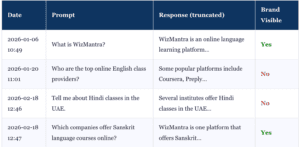
Save the file, then run python3 tracker.py in the same folder. The terminal prints a visibility rate for each prompt, and the full log lands in ai_visibility_log.xlsx. It looks something like this:
Prompt
Response (truncated)
Brand named
What is WizMantra?
WizMantra is an online language-learning platform offering…
Yes
Best online spoken English providers?
Popular options include Preply, Cambly, italki…
No
Recommend online Hindi classes.
Several institutes offer beginner Hindi classes…
No
Companies offering online Sanskrit courses?
WizMantra is one platform that offers Sanskrit…
Yes
How to read your AI visibility score
The brand-named column is your core metric. Read it in two layers:
Direct brand prompts (“What is [brand]?”) should almost always come back Yes. If they do not, your brand has close to zero footprint in the model, a serious signal that the wider web barely references you.
Category prompts (“best providers of X”) coming back No means competitors are capturing the AI recommendation you want. That is the gap worth money.
Track the rate, not one answer. Because you run each prompt three times, you get a visibility percentage per prompt. Watch that number move month over month as you build authority.
Pro tip: the prompts you choose decide everything. Think like your customer and reuse your real keyword research. The overlap between search intent and the questions people ask an AI is your map. If you already have a keyword and intent audit, you are halfway to a good prompt set.
How to actually improve your AI visibility (the GEO playbook)
Once you know where you are invisible, the fixes are specific, and several are backed by early GEO research rather than guesswork.
44%
of AI citations come from the first 30% of a page, so front-load the clear answer
Source: GEO citation studies, 2026
+115%
visibility lift from adding source citations to a mid-ranking page
Source: Princeton GEO research
+40%
lift from adding statistics and quotations to content
Source: Princeton GEO research
82%
of AI citations come from third-party earned media
Source: GEO citation studies, 2026
Front-load the answer. Put the clear, quotable answer near the top of the page, not buried under a long intro. Nearly half of AI citations are pulled from the opening portion of a page.
Add evidence. Cite sources, add real statistics, and include short quotations. Princeton’s GEO research found these lift AI visibility by 30 to 40 percent, and adding citations alone produced a 115 percent relative lift for pages mid page one. Models prefer content they can verify.
Earn third-party mentions. If most AI citations come from earned media, then digital PR, expert commentary, directories, and reviews are not optional. A brand the web talks about is a brand the models repeat.
Fix your entity. Keep your name, category, and description consistent across your site and every profile, and mark it up with structured data so machines resolve you to one clear entity.
Build a cluster, not a lonely post. Models cite brands that cover a topic across several linked pages. This is the same topical authority logic that already wins in search, and it is why sequencing matters, technical foundation first, content second.
Keep it fresh. Language models favour the most recent version of an article that matches a query, so update and re-date your cornerstone content instead of letting it age.
Scaling this further
The script is a foundation. Once it is running, extend it:
Test across multiple models, OpenAI, Claude, and Gemini, since each has different training and retrieval sources.
Add a sentiment column, so you track not just whether you are mentioned, but how positively.
Schedule it with cron to run weekly and build a trend line automatically.
Pipe results into Google Sheets for a live team dashboard.
Frequently asked questions
What is AI visibility?
AI visibility is whether large language models like ChatGPT, Gemini, and Perplexity name your brand when they answer your customers’ questions. It is the AI-era equivalent of a keyword ranking, measured by mention rather than position.
What is GEO (generative engine optimization)?
GEO is the practice of optimising your content and brand so AI engines cite and recommend you. It reuses SEO foundations, authority, structure, and clear entities, but the target is the AI answer, not the search results page.
Does ChatGPT use the live web or only training data?
Both. ChatGPT blends static training data with a live retrieval layer for current queries. Perplexity retrieves from the live web on almost every query, and Gemini leans on Google’s index. That is why fresh, well-structured content can surface quickly in some engines and slowly in others.
How often should I run the tracker?
Monthly is a sensible baseline, plus a run after any major content or PR push. Always repeat each prompt at least three times, because AI answers vary between runs and a single response can mislead you.
Do I need to know how to code?
Only a little. If you can open a terminal, install a package, and paste a script, you can run this. If you would rather not, the same measurement can be set up for you as part of a consulting engagement.
Is AI visibility replacing SEO?
No, it complements it. The same signals that earn AI citations, authority, clean structure, consistent entities, and third-party mentions, are the signals that already drive strong search rankings. You are extending SEO, not abandoning it.
Want to know if AI is recommending you or your competitors?
I run AI visibility and GEO audits alongside classic SEO, measuring where you show up across ChatGPT, Perplexity, and Gemini, then building the authority and structure that gets you cited. Start with a conversation.
About the author: I am Ram Kr Shukla, an SEO and growth consultant helping brands grow their organic and AI-driven visibility. This script came out of my own need to track a brand’s presence across AI platforms, and I have been refining it since 2025. Want a version built for your brand? Get in touch.